
Start with the settlement's unmet needs
The official Demo FAQ makes food and equipment central to upgrading a settlement. Before changing the county's layout, open the settlement information and identify which needs are still missing from the food and equipment categories. This gives you a specific supply problem to investigate, instead of treating every unavailable upgrade as evidence that you need another settlement or a different mayor.
A producer somewhere in the county is not enough to show that the selected settlement's need has been met. Follow the required good from its source through the connection that is meant to deliver it, then return to the receiving settlement's needs. The useful question is whether the actual consumer is supplied, rather than whether the map contains a building with a promising production label.
Distinguish level progression from building space
Opening another building slot and increasing the settlement's level are related progression outcomes, but the research explicitly distinguishes them. Equipment can unlock building space within an existing settlement, while the Level Up control handles the change in settlement level after the relevant needs are satisfied. Do not use one event as proof that the other should already be available or has already happened.
This distinction is useful when your immediate problem is simply finding room for another producer. Check the equipment situation before deciding that the settlement needs a higher level to accommodate every additional building. If the question is about reaching a new stage of settlement development instead, investigate the full set of needs and the level-up control, rather than only the number of occupied building slots.
Build the equipment chain you actually need
The buildings diary explains early equipment through concrete production chains, including logs for wooden chests and wool for wool tunics. These examples show why equipment supply depends on more than selecting a finished product in the settlement's needs. The raw material, its processing building and the route to the consumer all belong to the explanation of how the equipment becomes available.
Use the production chains guide when the settlement asks for equipment that is not arriving. Start with the finished good, identify the workshop that makes it and inspect the input feeding that workshop before expanding elsewhere. This avoids confusing an equipment shortage with a construction-point shortage, even though both can become visible while you are trying to add more buildings to the same settlement.
Check the food recipe and its ingredients
Food supply deserves its own check because a selected meal depends on the availability of its ingredients. The researched settlement explanation says that the meal's efficiency benefit requires every ingredient, so one available food item does not establish that the whole recipe is supported. Read the selected meal alongside the stock and producers that are supposed to serve it, rather than assuming that any nearby farm covers every food need.
If ingredients exist but are not reaching the settlement, inspect the connection between the producing and consuming sites. The official FAQ describes local distribution through connected settlements once a food recipe is selected, making delivery part of the needs check. The food shortage guide separates a missing ingredient from stock that exists elsewhere but has not reached the settlement attempting to grow.
Use the correct level-up control
The official October FAQ places the Level Up control beside the mayor portrait in the settlement interface. Use that control after meeting the required food and equipment needs, rather than treating the construction of another building as the level-up action itself. The position of the control also helps distinguish settlement management from county-wide production or trade screens when you are checking the immediate blocker.
Return to the needs information if the upgrade is still unavailable, and verify that you are checking the settlement you intended to develop. A neighboring producer may be operating correctly while a different settlement remains short of the goods it consumes. Keeping the recipient, its needs and its level-up control together makes the diagnosis more precise than judging progression from the appearance of the wider region.
Recognize the demo's progression limit
The updated demo allows settlement progression through level 2 and introduces the Commoner class. Reaching that limit is different from failing to provide enough food or equipment, because the demo does not offer the same progression range as the announced Early Access version. Once you identify the version limit, continuing to search for another ingredient cannot by itself establish a further demo upgrade.
The Early Access information describes progression through level 4, with additional social classes beyond the demo's range. Those are announced capabilities of that version, not evidence that the current demo can be extended through a hidden upgrade sequence. The Early Access guide keeps the release plan and expanded content separate from the systems you can currently explore in the free demo.
Trace a blocked upgrade in a useful order
A practical sequence is to check the settlement's needs, identify the missing good, inspect its producer and verify delivery to the receiving settlement. After that, check equipment-related building space and compare the settlement's current level with the version limit. This is a troubleshooting order drawn from the documented systems, not a claim that every unavailable button has the same cause or requires every step.
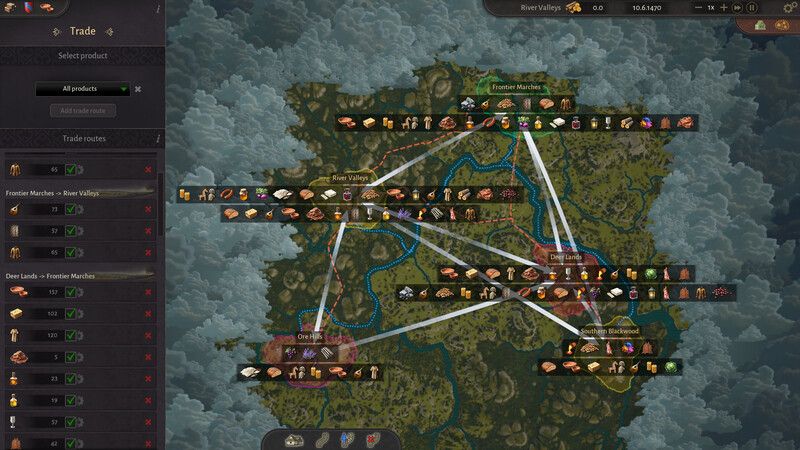
Keep local supply and trade between regions distinct when following a missing delivery. A road-connected producer within the region is a different situation from a product that must arrive through an explicitly configured inter-region route. Read the trade routes guide if the required supply is outside the region, especially when river direction or a heavy material is involved in the chain supporting further development.
Plan growth around the next requirement
The buildings diary describes development from Hamlet to Village and the appearance of buildings associated with new social classes. That makes upgrading an expansion of the county's production responsibilities as well as a visible improvement to a settlement. Review what the settlement needs and what the surrounding network can provide before assuming that a successful upgrade ends the work of balancing supply.
The clearest progression plan connects the next settlement improvement with a known production and delivery role. Maintain the distinction between equipment slots, settlement levels and version limits so that each new goal has an identifiable requirement. For the opening foundation, return to the beginner guide, which links food, logging and carpentry before broader expansion makes the settlement network harder to diagnose.
Official sources
Information checked November 4, 2026. Send a correction.